Skip to content
Operating system for your business

The operating systemfor growing business.

Lighter than Odoo. Deeper than Airtable. Retires Miro, Google Docs, Typeform and the half-dozen others on your SaaS bill — and plugs into the accounting system you already use. Run your business on one bill instead of nine.

Juxtaboard dashboard showing total revenue, orders by status, and revenue by channel for a small specialty coffee business.

Trusted by operators replacing 6–10 tools at once.

  • Northwind Roastery
  • Atlas & Oak Studio
  • Foundry Goods
  • Hi-Fi Coffee Bar
  • Driftwood Beverages
  • Park Lane Ceramics
How it lands in your stack

Lighter than Odoo. Deeper than Airtable.

Built for the SMB that already chose flexibility over a heavy ERP — and now needs the operational backbone to grow without a re-platform.

Remove

What it replaces

The 6–10 line items on your SaaS bill

  • Airtable, ClickUp, Monday
  • Notion, Coda, Google Docs
  • Miro, FigJam
  • Typeform, Tally
  • Basic CRM (HubSpot Free)
  • Light inventory / MRP (Katana, MRPeasy)
  • Customer & vendor portals
  • Site builders for landings and shops
Add

What it adds

What no flexible workspace ships today

  • PIM / DAM as first-class records
  • Orders, invoices, ledgers
  • Light SCM, inventory, BoMs, lot tracking
  • Tasks & projects with kanban and timeline
  • SOPs, internal wikis, and public knowledge bases
  • Customer and wholesale portals on every record
  • AI-built landings, forms, and storefronts
  • Embedded dashboards on the same data
Keep

What it talks to

The systems we deliberately don't replace

  • QuickBooks, Xero, FreshBooks
  • Local accounting and e-invoicing
  • Shopify, Etsy, Faire storefronts
  • Payroll, payments, tax engines
  • Email and calendar
  • Heavy discrete MRP and shop-floor scheduling

ICP: services-led SMBs and small-batch manufacturers, $1–20M revenue, today running Airtable or ClickUp plus QuickBooks or Xero plus Shopify and a bolt-on inventory tool.

Five primitives

Every business object lives in one of these.

Pick the shape that fits the work — then connect them. The same row that drives your kanban shows up on a customer portal and rolls into the dashboard.

01

Data tables

Relational records, typed columns, real referential integrity.

Products, contacts, orders, invoices, inventory. Lookup, rollup, formula, status workflow, variant matrix — the engine handles it. Open data backbone underneath so your agents and integrations plug in on day one.

Use it forProducts, customers, orders, inventory, anything
Coffees· 12 rows · 8 columns
By roast
#NameOriginRoast$/kg
1Ethiopia YirgacheffeETLight$24
2Colombia HuilaCOMedium$19
3Espresso No.7 (blend)Med-dark$22
4Brazil CerradoBRDark$17
+ Add row…
02

Collaborative spreadsheets

Real formulas, real-time, with cells linked to records.

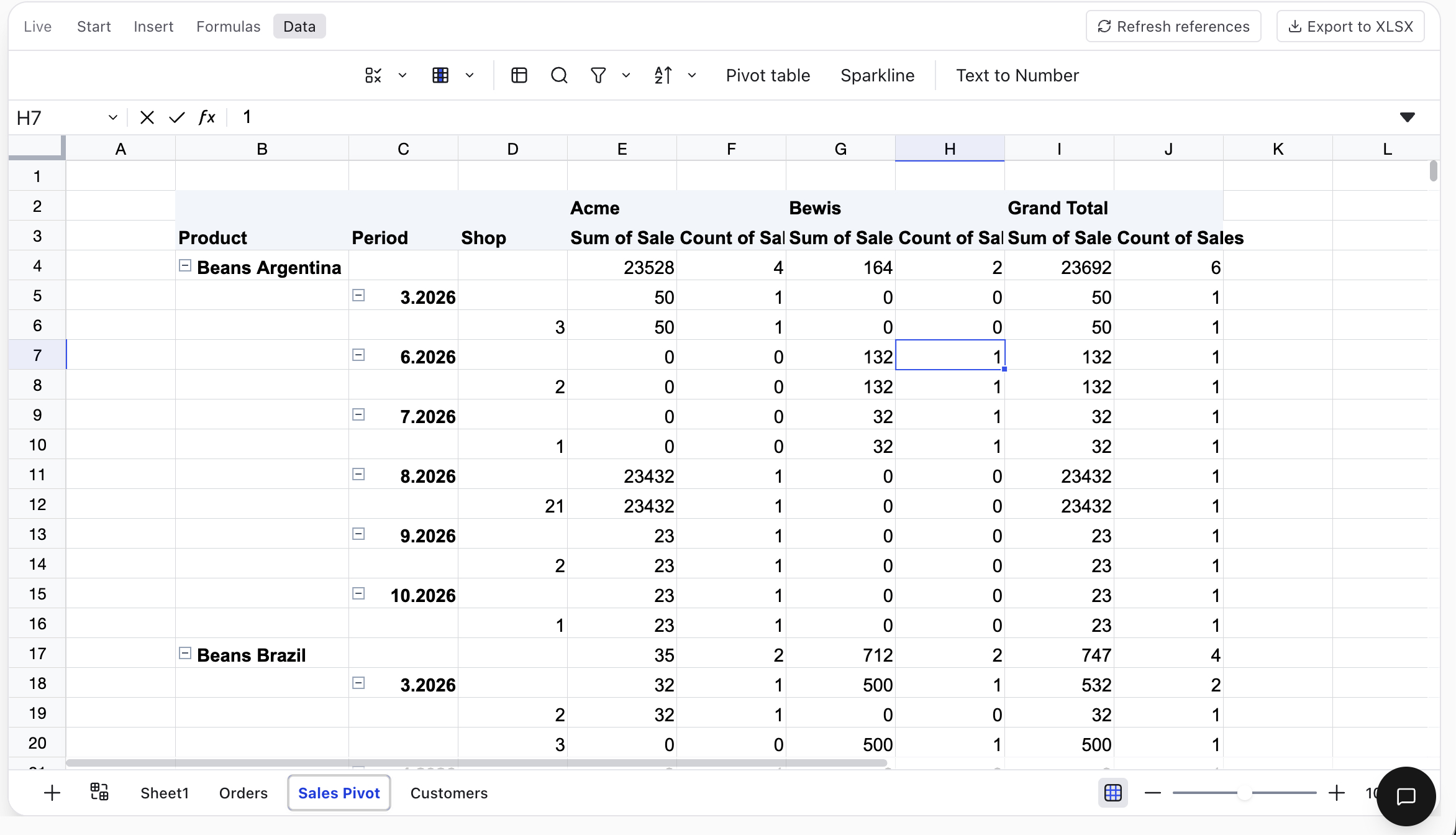
A spreadsheet that knows about the rest of your data. Reference a product row, sum your orders by channel, model next quarter — without copy-paste from a CSV.

Use it forBudgets, models, ad-hoc analysis
Collaborative spreadsheet showing a pivot table.
03

Collaborative documents

Versioned, multi-cursor, with embedded data and live blocks.

Contracts, SOPs, briefs, customer-facing playbooks. Version history, comments, and external-review workflows are first-class. E-signing lands this quarter.

Use it forContracts, SOPs, briefs+ e-signing coming soon
Wholesale agreement — Café Atlas.docxv.4

Wholesale agreement

This agreement is made between Northwind Roastery LLC (the Supplier) and Café Atlas (the Buyer), effective …

Pricing follows the Price list (wholesale) on the Supplier's platform, resolved per region and qty bracket on the day of order.

Signature field —+ e-signing coming soon
04

Whiteboards

Visual collaboration that doesn't ship customers to Miro.

Sketch a launch plan, present a quarterly review, walk a customer through their roadmap. Embed live records and dashboards on the canvas — no screenshots.

Use it forPlans, presentations, customer reviews
Spring launch plan
Workstream
Wholesale rebrand
Launch
Apr 2026
Budget
$12,400
Funnellast 30d
Awareness
Interest
Intent
05

Tasks & projects

Kanban, calendar, timeline — whichever view the work needs.

Tasks are rows in a data table, which means they reference anything: a product launch, a customer account, a purchase order. Group by status, swim by project, schedule on a Gantt.

Use it forLaunches, ops, customer rollouts
Tasks kanban board with status columns.
Customer-facing surfaces

Same data, projected out.

Every record can become an internal view, a customer portal, a public form, or an AI-generated site. One backbone — many surfaces.

View orderCAPO-2026-0014 · 24kg Yirgacheffe · pendingInvoice INV-1042 · $3,140 · due Jun 14

Customer & contractor portals

Scoped views for every account. Buyers see their orders and invoices, vendors see their POs, contractors see their tasks — all served from the live data, all gated by row-level rules.

"Build a wholesale signup page in our brand colours"Sign upFrom your data

AI site & shop builder

Generate a landing page, a wholesale signup form, or a small storefront by describing it. Backend is your tables — no separate CMS to wire.

Total revenue$120,947Orders by statusRevenue by channel

Embedded dashboards

Live analytics on the same records. Drop a dashboard inside a doc, expose it on a portal, send a snapshot to an investor — the data stays current.

accountsordersorder_linesREST · webhooks · typed events

Open data backbone

Typed schemas, REST and webhook APIs, signed event streams. Your agents and external apps integrate against a real contract, not a spreadsheet.

Knowledge base

A confluence-grade wiki that pulls its weight.

Structured documents, cross-references to any record, an AI grammar pass in the editor, an assistant grounded in your project, semantic search, and one-click publishing to HTML, DOCX, or PDF. Every doc lives on the same backbone as your data.

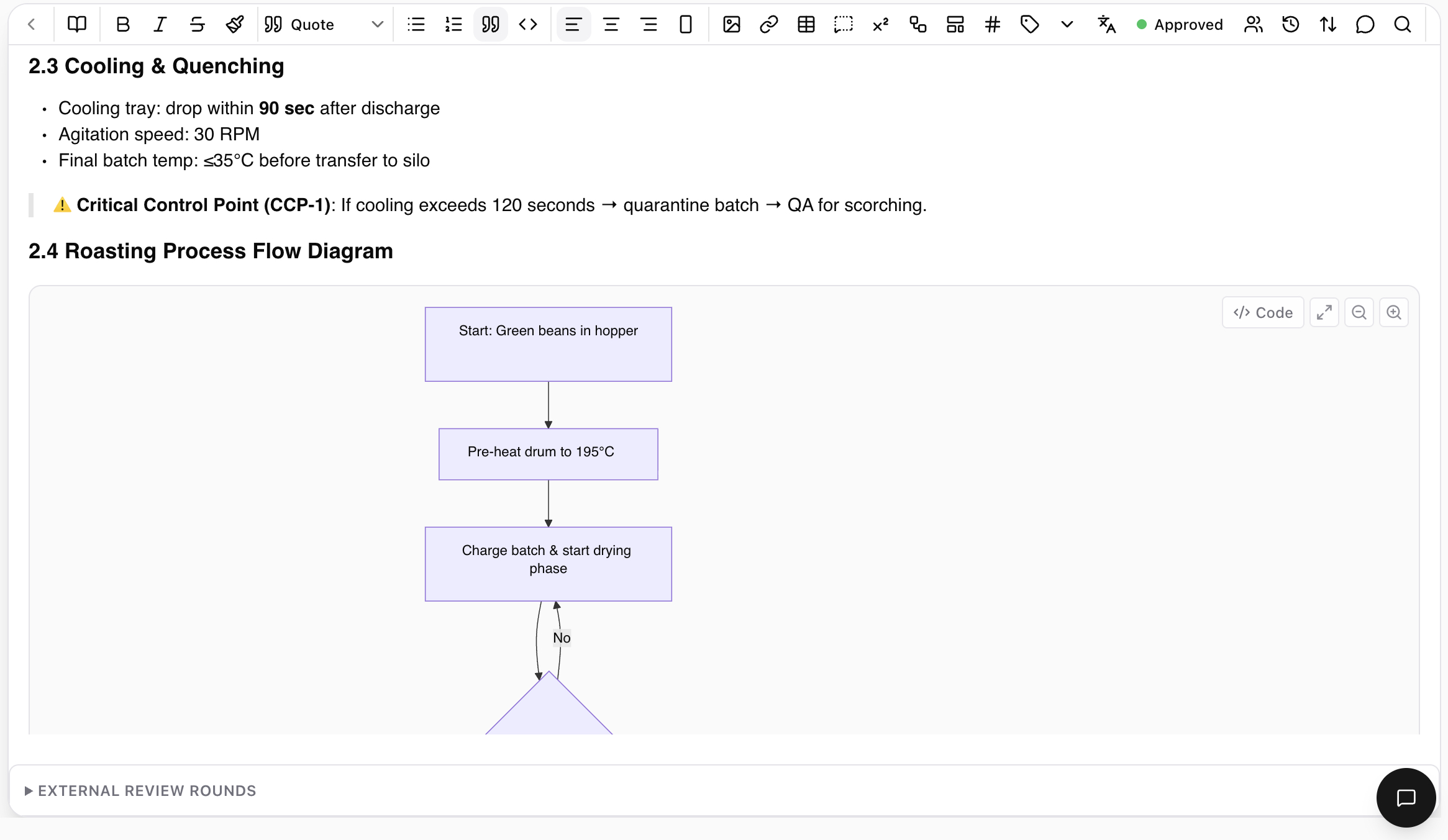
SOP for coffee roasting showing section 2.3 Cooling & Quenching with bullet steps, a Critical Control Point callout, and an embedded process flow diagram in section 2.4.

Documents as primitives

Living SOPs with tables, code, embedded diagrams, and an approval flow.

A rich-text editor that knows about the rest of your data. Reference any record, table row, or doc. Embed Mermaid diagrams. Drop in code blocks and pivot-style tables. Sections, callouts, status workflows, external-review rounds — all first-class. Versioned forever.

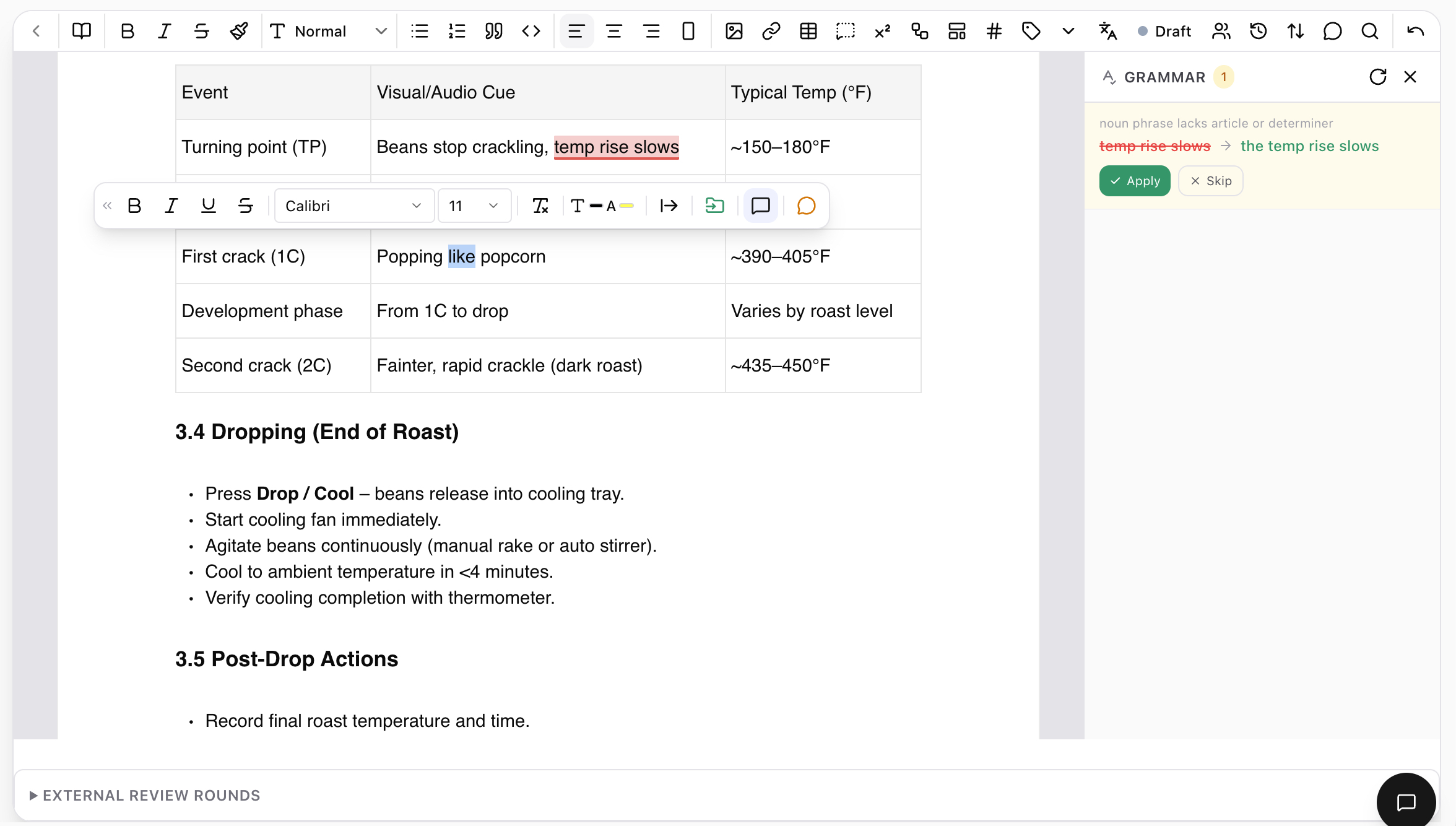
Editor view of a phase-change table inside an SOP, with a sidebar grammar suggestion 'noun phrase lacks article or determiner — temp rise slows → the temp rise slows' with Apply and Skip buttons.

AI grammar

Catch the bad sentence before it ships.

Inline suggestions appear as you write — apply or skip with one click. Run a full pass before publishing. Picks up house tone over time.

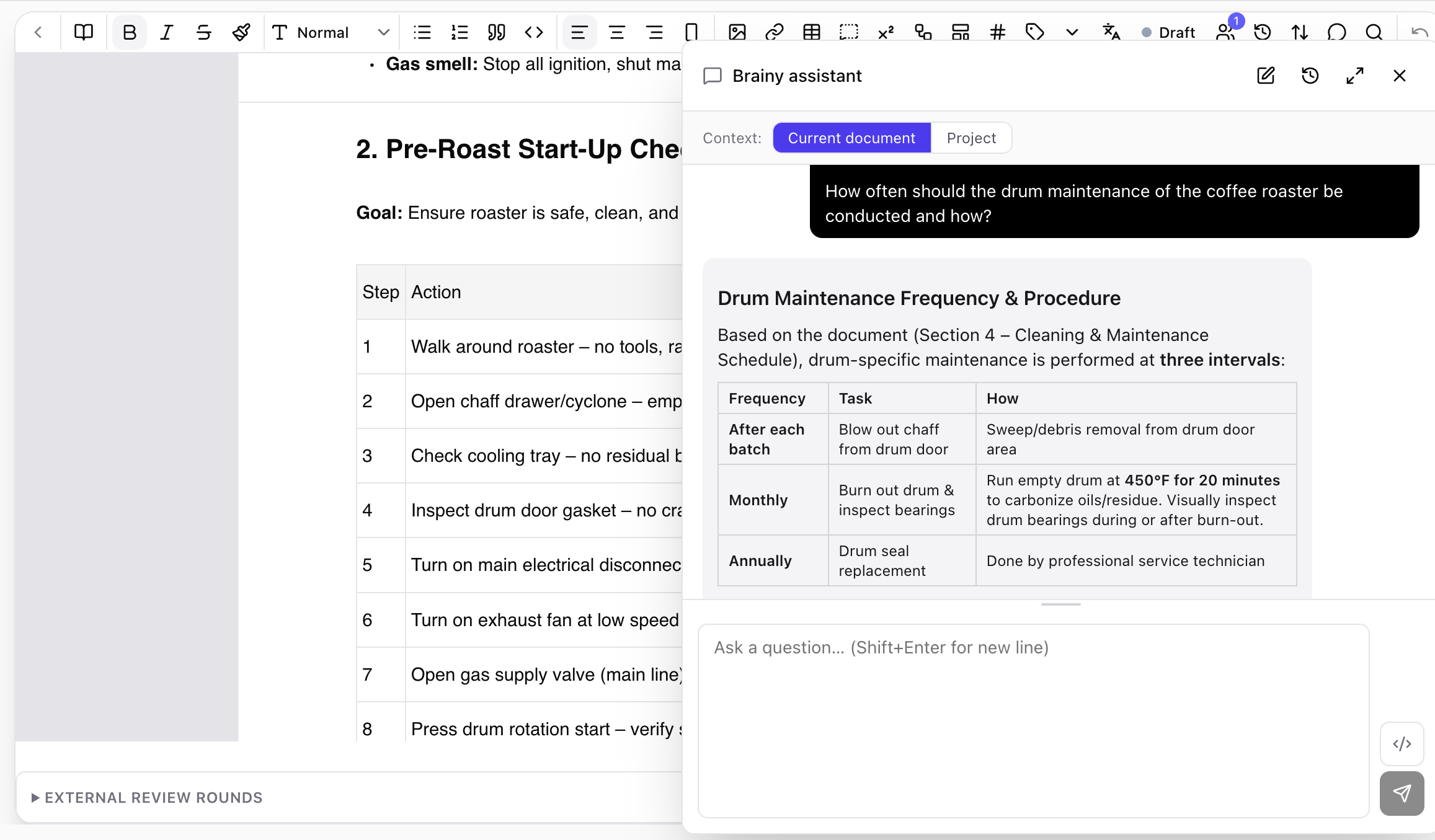
Document with the Brainy assistant panel open. A question 'How often should drum maintenance be conducted?' has an answer with a Frequency/Task/How table cited from Section 4 — Cleaning & Maintenance Schedule.

Brainy assistant

An AI that actually read your docs.

Open the side panel and ask. Brainy answers from the current document or the whole project — and cites the section it pulled from. Returns tables, lists, or code when the question calls for it.

Knowledge ops

Built for the long haul.

Cross-references & backlinks

Link a doc to a table row, an order, a customer record. Every doc carries a backlinks panel showing where it's referenced — invaluable when audit comes calling.

HTML, DOCX, PDF on demand

Same source, three exports. Diagrams render. Tables paginate. Page numbers, headers, and branded covers via reusable export templates.

AI translations

Translate a document into another project locale with blocks and refs intact. The translation stays linked to the source so changes propagate.

Semantic search

Search by meaning across docs, records, and discussions. Finds the right paragraph even when you don't remember the exact phrase.

Public portal

Publish a subset of docs to a public URL with its own domain. Pricing pages, help center, customer-facing playbooks — same workspace, same source.

External review rounds

Invite an outside reviewer to comment or sign off on a specific document. The round, the messages, and the decision are captured in the version history.

ERP coverage

The modules a small business actually needs.

Map the eight ERP areas that drive an SMB onto Juxtaboard's primitives. Core today. Templates and roadmap clearly marked.

ModuleTablesSheetsDocsBoardsTasksPortalsAI sites
PIM — Product information
DAM — Digital assets
Orders & invoicing
SCM — Supply chain & stock
CRM — Sales & pipeline
Projects & ops
HR & people ops
Budgeting & light finance
Core todayTemplate / partialIntegrated or roadmap

Production — light MRP (BoMs, work orders, lot tracking) — is in core scope. Heavy discrete MRP, capacity planning, and shop-floor scheduling are integrated with specialists, not built.
Inside the product

Inside the product

PIM with attribute inheritance

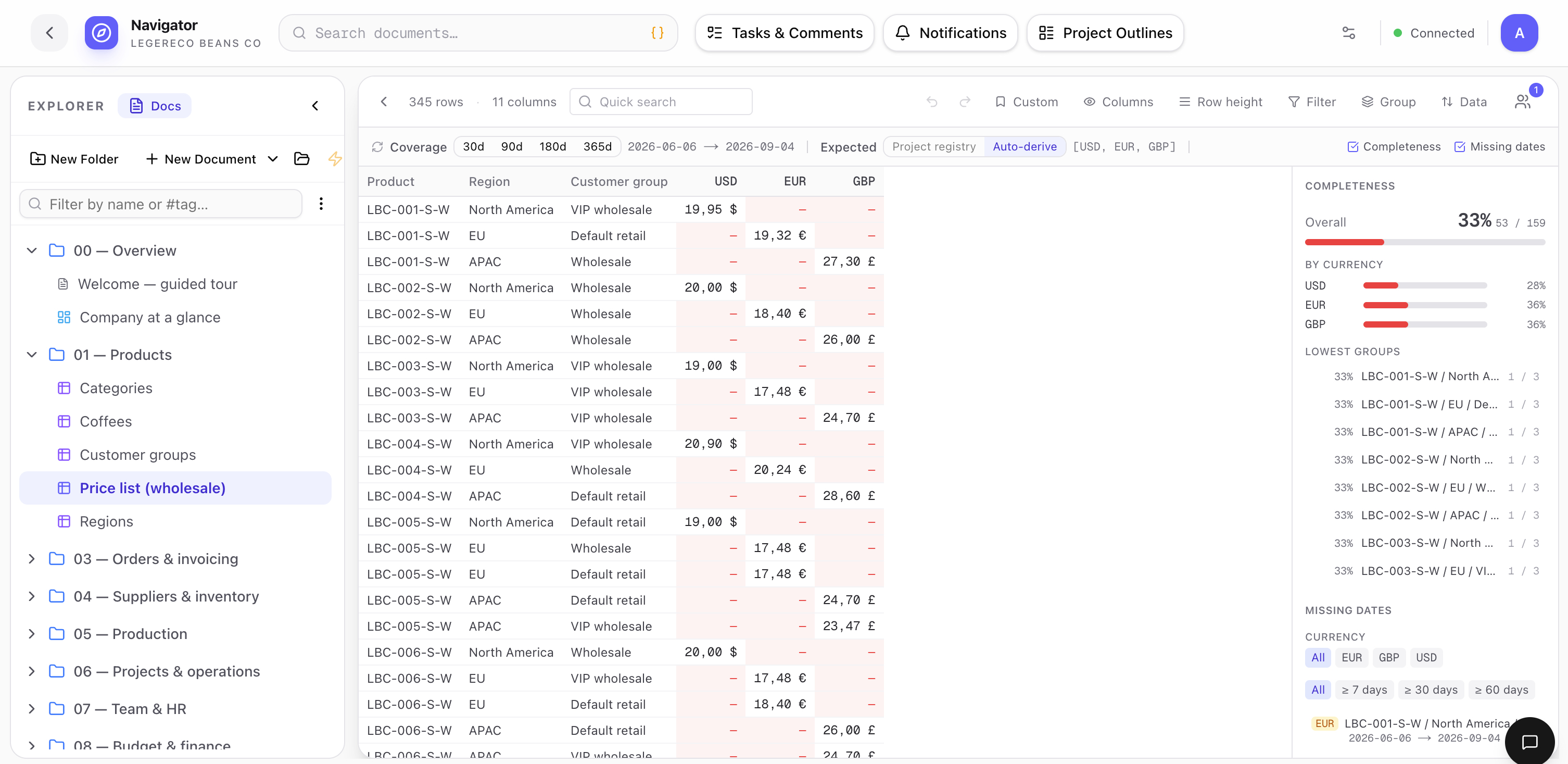
A price list that resolves by region, customer group, qty bracket, and validity window.

Master products carry the shared attributes — variants override only what's different (size, grind, packaging). Tiered prices live in a structured list with region, customer group, quantity bracket, and validity window. Every order line picks up the right price automatically.

Wholesale price list showing tiered prices by region (North America, EU, APAC), customer group (VIP wholesale, Default retail), and quantity bracket, with currency totals in USD and EUR.

Orders, invoices, status workflow

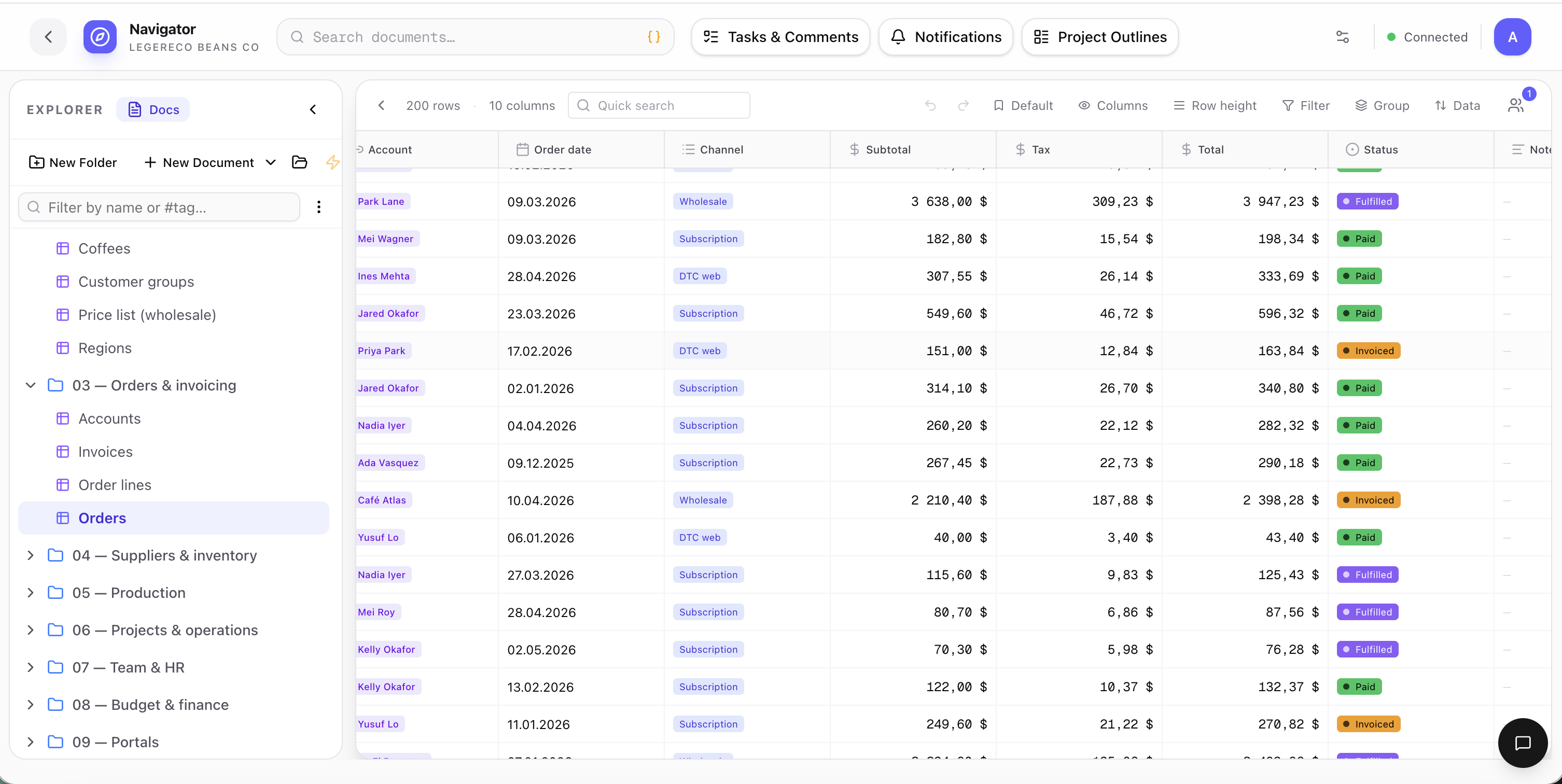
Drag a card from Confirmed to Fulfilled — the ledger entries write themselves.

Orders is a data table with a status workflow (Draft → Confirmed → Fulfilled → Invoiced → Paid). Lines reference SKU variants, account references roll up to total spend per customer, and the invoice ledger materializes balances per account in real time.

Orders grid view with 200 rows, columns for account, order date, channel, subtotal, tax, total, status, and notes — color-coded status pills for Paid, Fulfilled, Invoiced, Confirmed.

Inventory backed by a real ledger

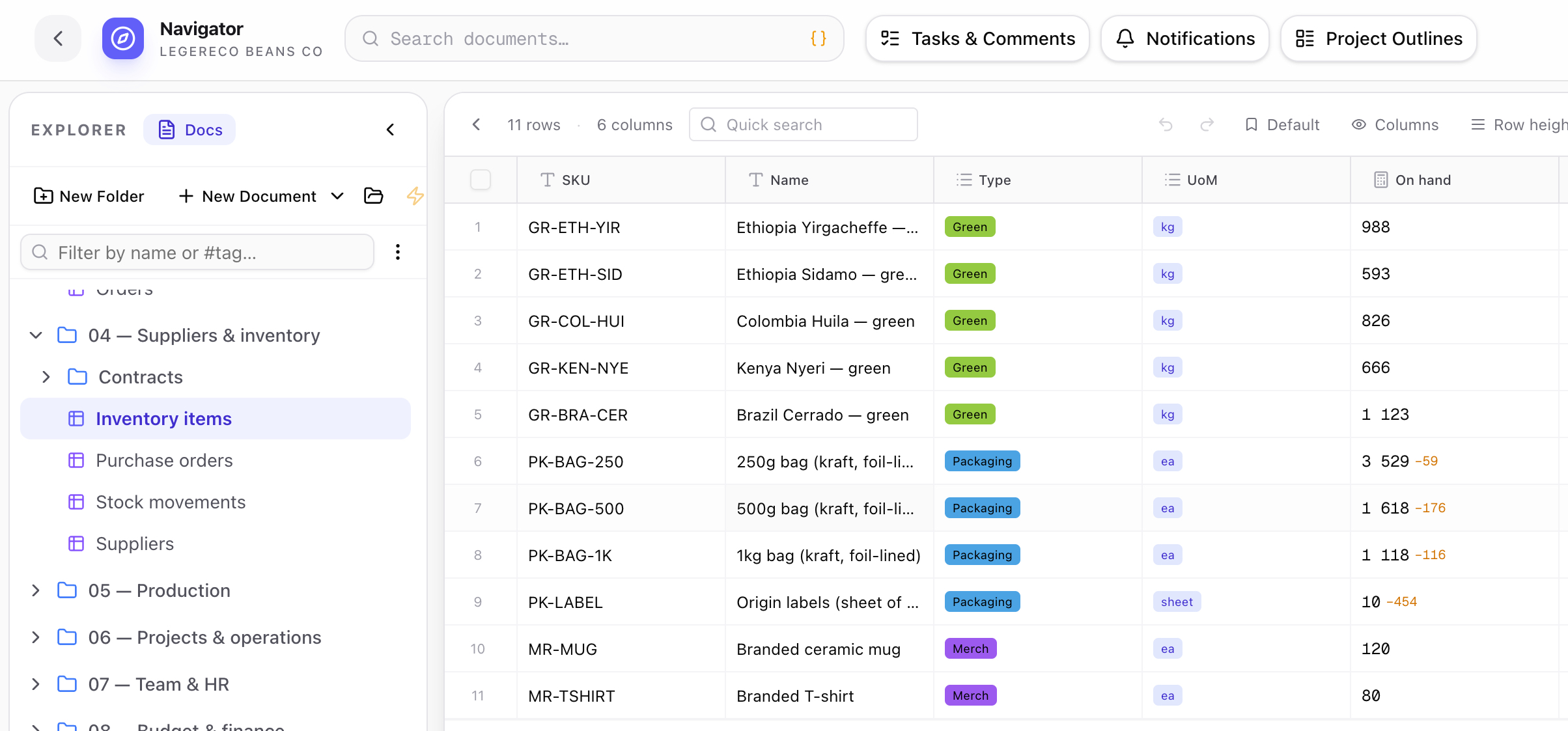
On-hand isn't a number you type — it's a balance the engine maintains.

Inventory items carry balance columns backed by a ledger table. Posted movements drive on-hand, pending movements drive reserved, available falls out as posted minus reserved. Reversals and as-of queries are first-class. Track by item, lot, or location.

Inventory items grid showing SKU, name, type (Green, Packaging, Merch), unit of measure, and on-hand quantities with reservation deltas highlighted in coral.

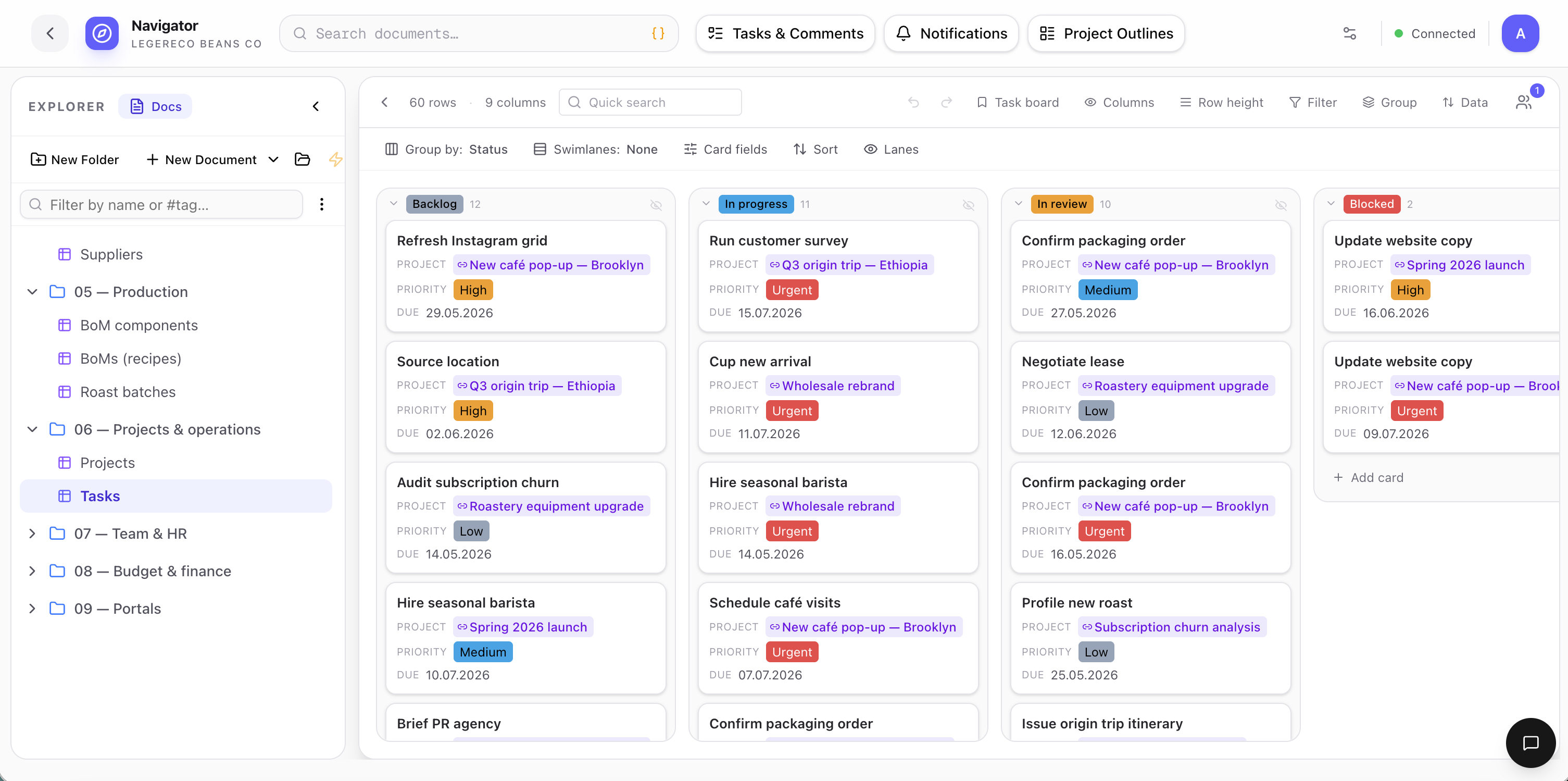
Tasks, projects, and the kanban that runs them

Every task references the project, customer, or order it's about.

Kanban swims by status. Cards reveal project lookup, priority, and due date inline. Switch to timeline for a Gantt over the same rows — no separate project tool, no separate data.

Tasks kanban board with columns for Backlog, In progress, In review, and Blocked. Each card shows project name, priority badge (High, Medium, Urgent), and due date.

Whiteboards on live data

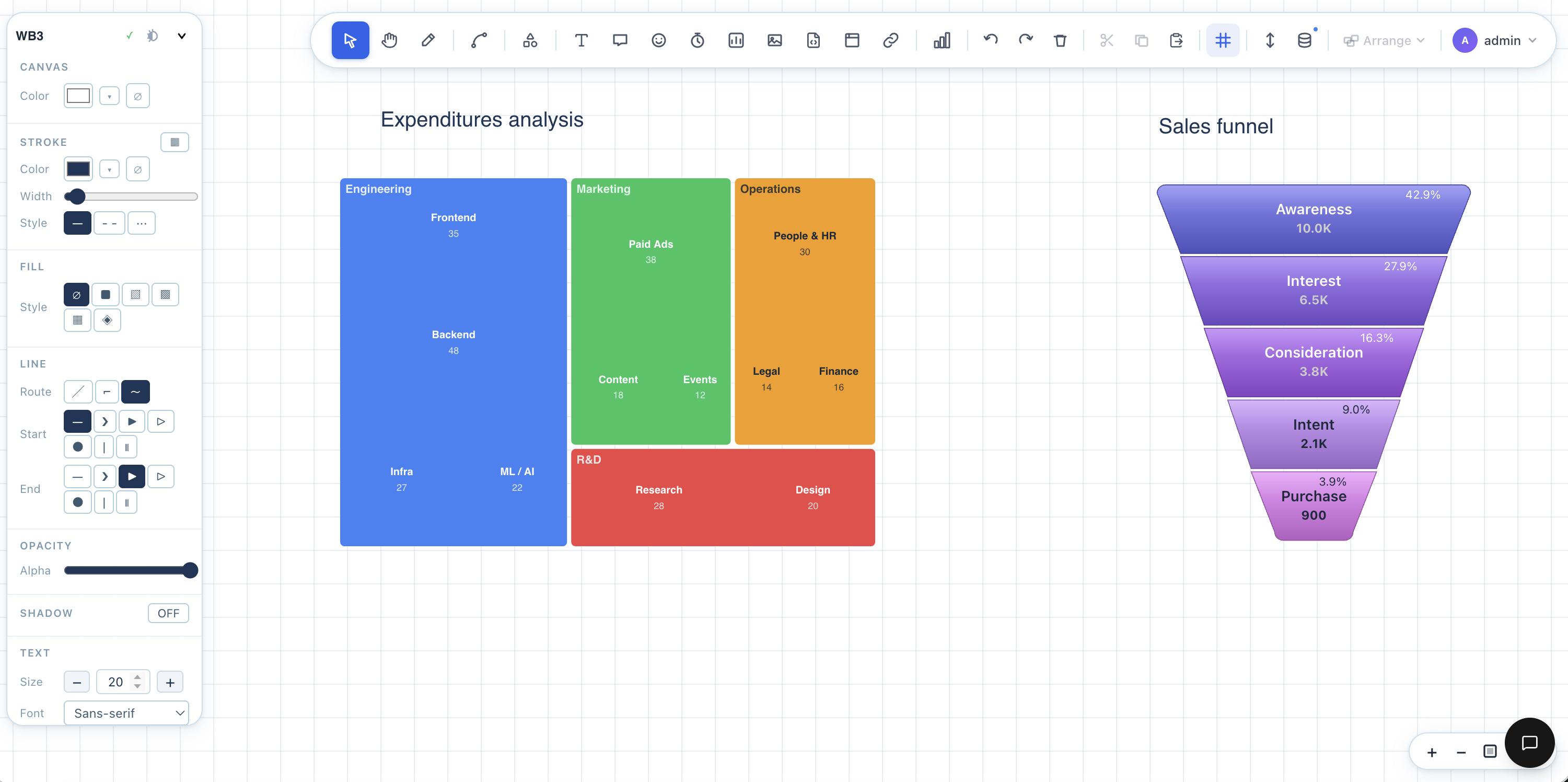
Plan a quarter, present to customers, embed a dashboard — same canvas.

Drag in a chart, a heatmap, a sales funnel, a roadmap. Live blocks update when the underlying records change. Use it for internal reviews or external presentations — share with one link.

Whiteboard canvas showing an expenditures analysis heatmap with departments and budgets, and a sales funnel visualization from awareness to purchase.

Dashboards on the same backbone

Embed analytics inside a doc, on a portal, in a customer report.

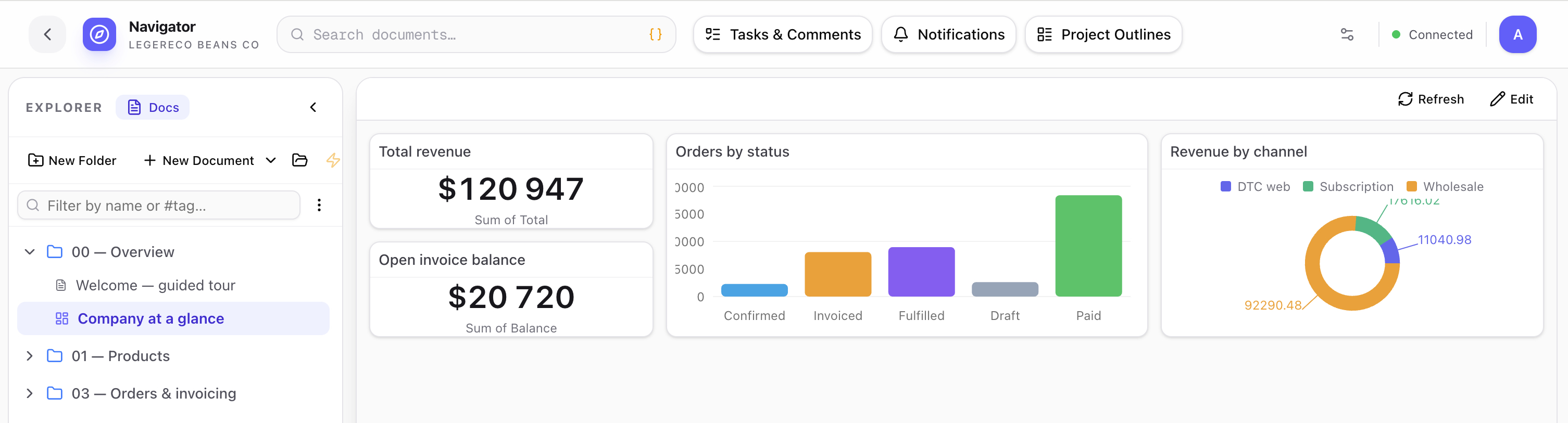
Total revenue, orders by status, revenue by channel, open invoice balance — composed from the live tables in seconds. Embed in any document, expose on any portal, share with any stakeholder.

Company at a glance dashboard with total revenue $120,947, open invoice balance $20,720, orders by status bar chart, and revenue by channel donut chart.
Competitive landscape

Workspaces don't go deep. MRP-light is single-purpose. ERPs aren't flexible.

We sit at the intersection.

CapabilityAirtableClickUp / MondayNotion / CodaHubSpotKatana / MRPeasyOdoo / NetSuiteJuxtaboard
Flexible data model
Collaborative spreadsheets
Collaborative documents + e-sign
Whiteboards
Tasks, kanban, timeline
PIM / DAM
Orders, inventory, BoMs
Customer and vendor portals
AI site / shop builder
Plugs into QuickBooks / Xero
SMB price point
StrongPartialMissing
Pricing

Per-seat SaaS. Same product, different depth.

Expand from a flexible workspace into a configured ERP without changing vendors. Annual billing shown — monthly is ~20% more.

Starter

For teams that need flexible tables, docs, and one customer portal.

$12per user / month

billed annually

  • Up to 25 seats
  • All 5 primitives
  • 1 customer portal
  • Basic AI builder
Start trial
Most teams pick this

Growth

For SMBs running operations on the platform — portals, automations, sites.

$28per user / month

billed annually

  • Unlimited portals
  • Embedded dashboards
  • Workflow automations
  • AI site & shop builder
Start trial

Business

For businesses turning Juxtaboard into a configured ERP.

$58per user / month

billed annually

  • PIM / DAM / orders
  • Light SCM modules
  • SSO + audit logs
  • Agent / partner APIs
Start trial

Platform

For solution partners and multi-org deployments.

Customplatform fee

billed annually

  • Multi-org tenancy
  • Private cloud / VPC
  • Solution-partner program
  • Revenue share on apps
Contact sales

Same workspace, all the way up. Move between tiers as your team and needs grow — your data, automations, and integrations come with you.

From the field

What operators are saying.

We replaced Airtable, three internal tools, and a wholesale portal we'd been paying $400/mo for. The roastery runs out of one workspace now and our café partners log in to see exactly what we see.

Mira Aldaña

Founder, Northwind Roastery

Small-batch CPG, 18 people

The PIM matrix and the price list are the unlock. We model 12 coffees × 12 SKUs each and the price list resolves by region and customer group on every order line. There's nothing else in this category that does this.

Jamal Reyes

Operations lead, Foundry Goods

Wholesale brand, 12 people

I'm the agency ops person who has been begging for years for tasks, briefs, time tracking, and client portals on the same database. Juxtaboard is the first thing that gives me that without writing code.

Hana Voss

Director of operations, Atlas & Oak

Creative studio, 24 people

Run every aspect of your business in one place.

Start with a workspace. Grow into an operating system.